
How I built 4 free tools that rank on Google and drive daily SaaS traffic
The Product-Led SEO Playbook, how I find, scope, build, launch, and improve free tools that drive qualified organic traffic for a SaaS product.
Update, 26 August 2026. Twelve months of data later, this playbook needs a correction. The tools did what they promised on traffic and failed on revenue, and I now know why. Skip to Part 11.
Hey!
My name is Lambert. I’m 23 years old, and I run growth at Morgen.
A few months ago, I joined my former colleague from Wooclap, Jim Hartung, to help drive organic traffic without paid ads. Morgen is a scheduling and productivity app, Jim had built a strong product, and the growth opportunity was wide open.
Most people in my position would have started a blog. Comparison articles. “Best X tools” listicles. The usual.
I didn’t write a single article.
I built free tools instead.
4 of them. They all rank on Google. This playbook is the exact process I followed, how I find, scope, build, launch, and improve free tools that drive qualified traffic for a SaaS product.
Every number comes from our Google Search Console. Every tool is live, you can go use them right now.
We’re also currently launching a new product called Kai, an agent designed to do things for people. It could change how people organize their work. I plan to apply and extend this exact playbook to drive acquisition for Kai as well. If the system works for free tools on a scheduling app, it should work even better when the product itself is built around AI.
This playbook is for you if:
- You work in SaaS and want organic traffic that doesn’t depend on publishing articles every week
- You’ve thought about building free tools but didn’t know where to start
- You want a system, not a one-off tactic
- You’re a growth person, marketer, or builder who wants to ship things that rank
Let’s go.
Part 1: Why build tools instead of writing articles?
Here’s how most SaaS companies do SEO:
- Find keywords
- Write articles
- Publish, optimize, repeat
That works when someone wants to learn something.
But what happens when someone wants to do something?
When someone googles “scheduling poll”, they don’t want to read a 2,000-word article about what scheduling polls are. They want to make a poll. Right now.
When someone googles “timezone meeting planner”, they don’t want a blog post. They want to plan a meeting across timezones.
I call this tool-intent vs content-intent. Most companies treat them the same way, they write articles for both.
That’s the gap.
How I decide what to build vs what to write
One question:
“Does this person want to DO something, or KNOW something?”
| If they want to… | Give them… | Example |
|---|---|---|
| DO something | A free tool | ”scheduling poll”, “calendar link generator” |
| KNOW something | An article | ”how to run better meetings” |
If the intent is “do” and you give them an article, you’ve already lost. You’re bringing a blog post to a tool fight.
Why this is possible now
Building tools used to require engineering sprints. Weeks of work. Even if you knew a tool would outrank an article, the cost was too high for a growth team to justify.
That changed. Not because “AI writes code now”, that’s the oversimplified version.
What actually changed is this: growth operators can now build things that don’t need to live inside the core product.
If a utility is adjacent to your SaaS but doesn’t need user accounts, databases, or deep backend logic, it can often be built as a standalone tool on your website. A scheduling poll. A timezone converter. A calendar link generator. These are not product features. They’re website utilities that solve real problems tied to your product space.
That’s where the leverage is.
Tools like Claude Code make this possible because they understand context. You can feed them your product knowledge, your keyword data, your design system, and they help you reason through what to build, how to scope it, and how to ship it. It’s not “AI generates a website.” It’s: a growth person with product context can now build and ship useful tools without waiting in an engineering queue.
This doesn’t mean developers are no longer needed. It means marketers and growth operators can ship independently for a specific class of initiative, the kind where the output is a standalone utility on the website, not a feature inside the product.
| Before | Now | |
|---|---|---|
| Article | 1 day | 1 day |
| Tool | 2–4 weeks (needs engineering) | 1–5 days (growth can ship it) |
When building a tool takes days instead of months, SEO stops being a content game. It becomes a product game.
Tools compound differently than articles
Articles decay. You stop updating them, rankings slip.
Tools are different. People bookmark them. People link to them from their own blogs. People share them with colleagues. Every user session sends engagement signals to Google.
A good tool gets stronger over time because people actually use it.
Takeaway: For tool-intent keywords, build a tool. For content-intent keywords, write an article. Most companies default to articles for everything. That’s your opening.
Part 2: How I find the right tool opportunities
The process is built around Claude
I don’t start with a brainstorm in a spreadsheet. I start with context.
My process uses Claude Code as the core reasoning layer. Here’s what I feed it:
- The codebase of the app: so it understands what the product actually does
- Internal product knowledge: docs, feature specs, positioning, user flows
- Ahrefs data via MCP: keyword volumes, difficulty scores, SERP analysis, competitor metrics
- Reddit and forums: real user pain points, how people talk about the problem
Then I give Claude a clear brief: identify free tool opportunities that are strategically useful for our product space. Not random utilities. Tools that create a pipeline, someone uses the free tool, and the experience feels connected to what the full product could do for them.
Even if the free tool doesn’t live inside the product today, it should feel like it belongs in the same ecosystem.
What Claude actually surfaces
With product context + keyword data + SERP patterns, Claude can identify opportunities I’d miss on my own.
It looks at:
- What people search for in our product space
- Which of those searches have tool-intent
- Where existing results are weak, require login, or have bad UX
- What we could build that adds value the current SERP doesn’t offer
I also validate with Reddit and similar sources, checking if real people are actually asking for these tools, what frustrates them about existing options, and what free alternatives exist (not just paid tools).
My actual brainstorm output
Here’s what the filtered list looked like. This is real data from Ahrefs:
| Idea | Volume (Global) | KD | Intent | What I did |
|---|---|---|---|---|
| Scheduling poll | 3,800 | 51 | Tool | Built it |
| Timezone meeting planner | 4,000 | 52 | Tool | Built it |
| Calendar link generator | Medium | Low | Tool | Built it |
| Schedule builder | 70K broad / 1K targeted | 50 | Tool | Built it |
| Focus timer | 3,000 | 44 | Tool | Too competitive (pomofocus, marinara) |
| Eisenhower matrix tool | 5,000 | 56 | Tool | Too competitive (Notion, Miro) |
| Energy planner | 800 | 28 | Info | Confused with solar panels |
| Task roulette | ~100 | 90 | Tool | No search volume |
| Screen time tracker | 500 | 60 | Tool | Too much dev work for too little traffic |
| Weekly planning template | 700 | 28 | Tool | Not enough volume yet |
I started with 20+. Ended up building 4.
That’s the point. You don’t build everything. You filter ruthlessly.
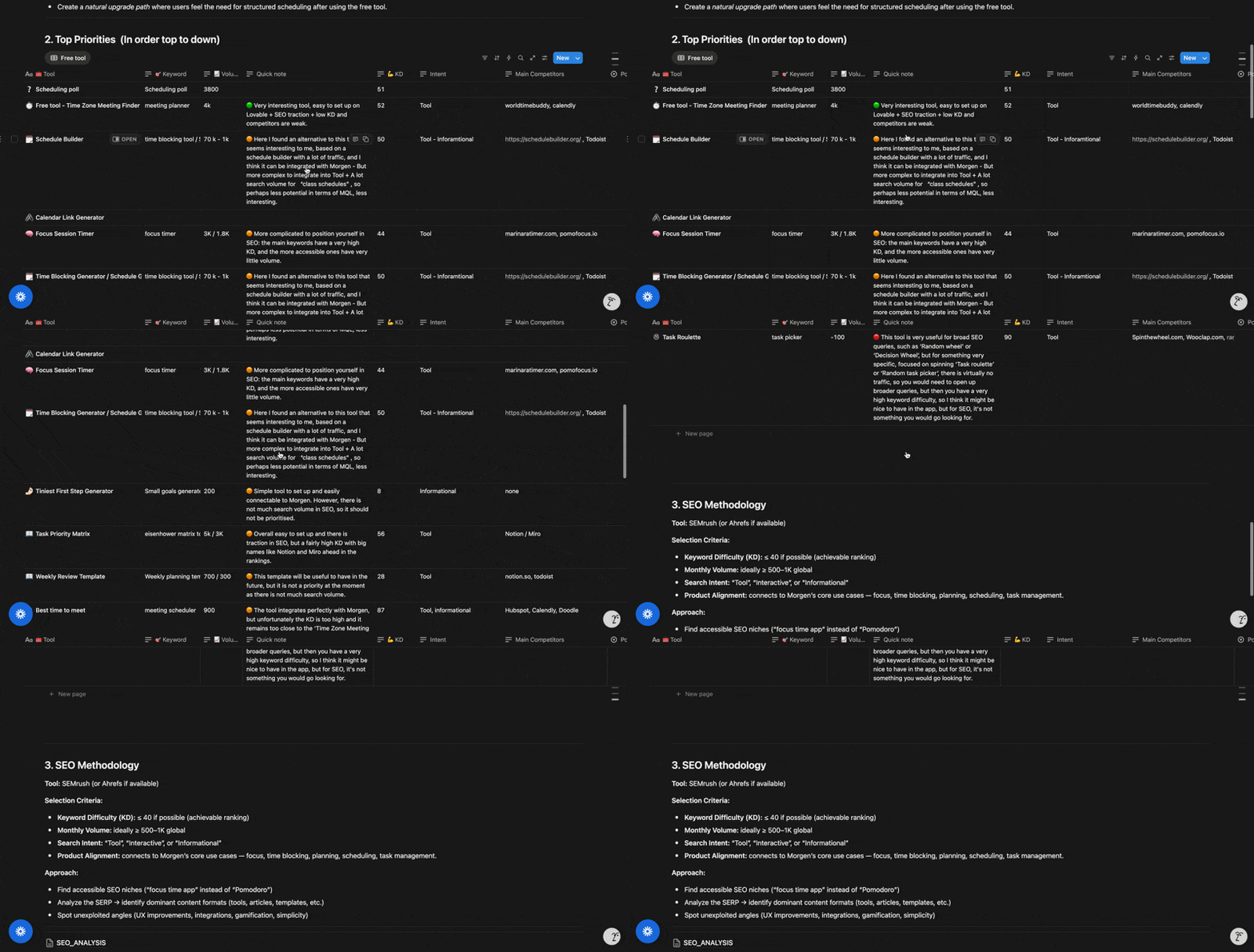
Part 3: How I prioritize what to build first
This is where most people mess up. They pick the idea they like best or the one that sounds coolest.
Don’t do that. Pick the idea the data supports.
I prioritize on 3 levers:
- Traffic / search demand: is there meaningful volume behind this keyword?
- Keyword difficulty / ranking opportunity: can we realistically rank for it?
- Speed / simplicity of building: can I ship this fast enough to create momentum?
The best first tool has all three: real traffic potential, a rankable keyword, and a fast build time.
Why I started with Timezone Meeting Planner
Not the biggest keyword. Not the coolest idea. But the best first move.
- Traffic potential: 4,000 monthly searches globally, solid keyword cluster around timezone-related queries
- Keyword difficulty: 52, doable for our domain authority (DR 72)
- Build speed: I built the core version in less than a day
That last point matters. The first tool needs to be a quick win. You want to prove the system works before committing to harder builds.
Everything around the core build took more time, SEO setup, design polish, landing page, internal review. But the functional tool was live fast. That gave me momentum and confidence to tackle the next ones.
Why Scheduling Poll and Schedule Builder came later
Scheduling Poll had strong numbers (3,800 volume, KD 51) but significantly more complexity. It needed shareable links, voting logic, multiple date/time handling. It ended up being the longest build, around a week.
Schedule Builder had massive broad volume (70K for “schedule builder”) but the targeted cluster was smaller. It was also a heavier implementation, drag-and-drop, visual blocks, responsive layout.
Both were good opportunities. But neither was the right first tool. Starting with them would have meant spending a week before seeing any result. Starting with Timezone Meeting Planner meant I had a live, ranking tool within days.
What I killed and why
- Focus timer: 3K volume, KD 44. Sounds doable, but pomofocus.io and marinaratimer.com already own this space. The main keywords have very high KD, and the accessible ones have almost no volume. Bad ratio.
- Eisenhower matrix tool: 5K volume, KD 56. There’s traction, but Notion and Miro are already ranking. Big names with huge DR. Not worth the fight.
- Energy planner: 800 volume, KD 28. Low KD looks tempting, but half the search results are about solar panels. The concept is also hard to build simply.
- Screen time tracker: would require building a Chrome extension. Too much dev work for 500 monthly searches.
Takeaway: The best first tool is the one with strong traffic, rankable difficulty, and a fast build. Don’t start with the hardest or the coolest, start with the one that proves the system works.
Part 4: Scoping the MVP
This is one of the most important parts of the process. And it doesn’t start with wireframes or feature lists.
It starts with building the right working environment for Claude Code.
Setting up the build environment
Before I build anything, I prepare:
- A strong
CLAUDE.md: this is the instruction file that gives Claude all the context it needs about the project, constraints, and expectations - Documentation: MVP scope doc, what the tool should and shouldn’t do
- Design rules: colors, typography, component patterns, spacing
- Implementation constraints: stack, framework, what libraries to use or avoid
- Deployment constraints: where this will be hosted, how it gets pushed live
That last point is critical. If you don’t specify deployment constraints from the start, you’ll hit conflicts later. In my case, I use GitHub with GitHub Actions / Pages, and then some tools get pushed into Webflow depending on the setup. Other people might use Vercel or Netlify, the point is: decide this upfront.
Competitor analysis shapes the MVP
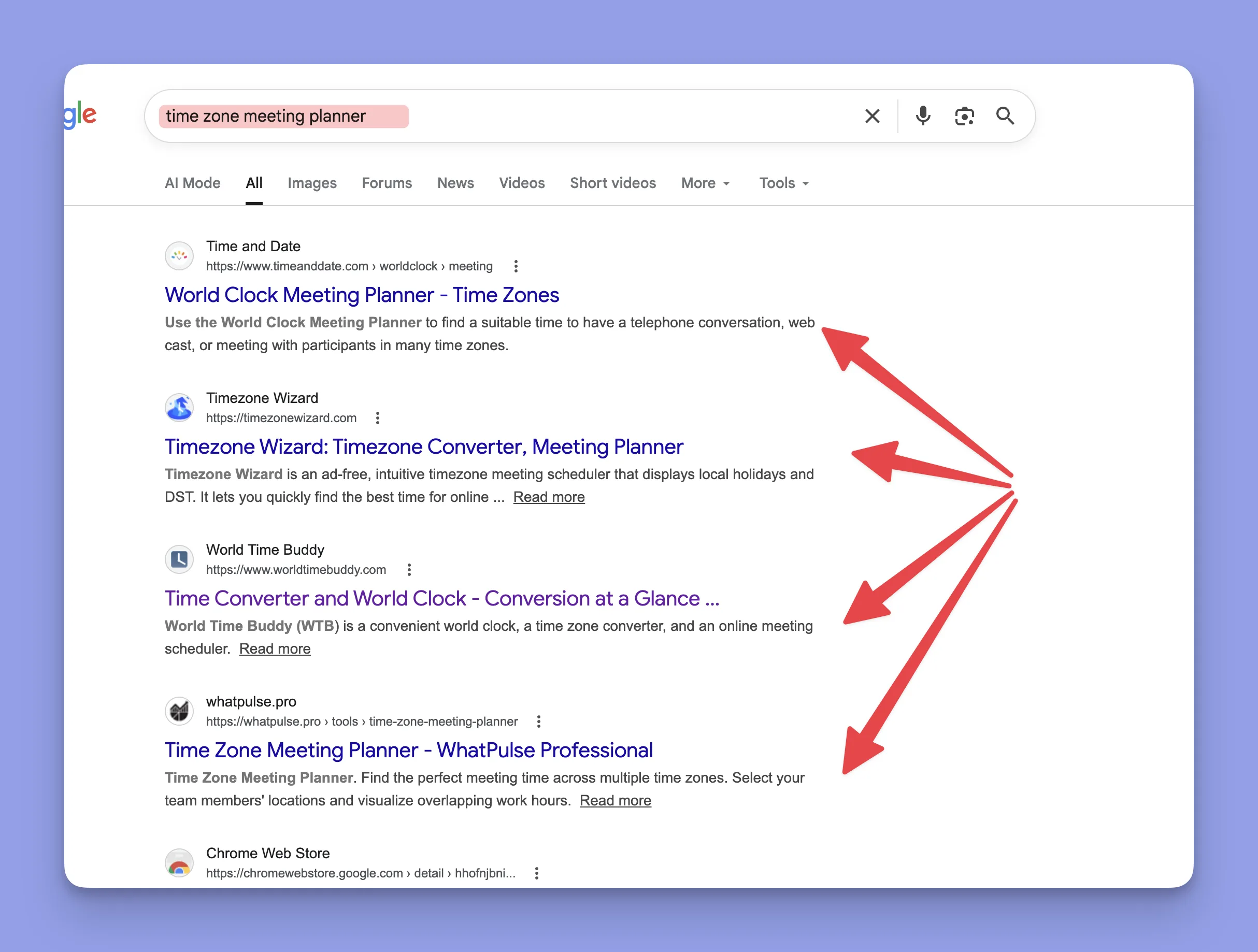
For each tool, I collect what the top 5 competitors on the SERP are doing.
I ask:
- What features do they all have?
- What’s weak, missing, or frustrating?
- What’s undifferentiated: what do they all do the same way?
- Where can we add value they don’t?
Claude helps process this quickly. Feed it the competitor URLs and the SERP data, and it can identify gaps in minutes.
From that analysis, the MVP takes shape, not from imagination, but from what the market is missing.
SEO and design prep happen in parallel
At the same time as scoping the MVP:
- I ask Claude to run a full SEO analysis for the tool and its keyword cluster
- I prepare MVP documentation: what the tool does, user flow, edge cases
- I prepare SEO documentation: target keywords, page structure, meta tags, internal linking plan
- I prepare design guidance: consistent with existing patterns
On the design side, I import the SaaS codebase and the website / Webflow context. This helps Claude stay consistent with existing design patterns and front-end logic. The tool should feel like it belongs on the site, not like a random side project.
What I actually shipped in v1
Timezone Meeting Planner v1:
- Compare times across multiple timezones to find overlapping availability
- No team features, no integration, no saved preferences
- Build time: less than 1 day (core version)
Calendar Link Generator v1:
- Generate Google / Outlook / Apple calendar links from event details
- No recurring events, no timezone auto-detection, no saved history
- Build time: ~1 day
Schedule Builder v1:
- Build a weekly schedule visually with drag-and-drop blocks
- No saving, no sharing, no export to calendar
- Build time: ~2 days (then improved over several weeks)
Scheduling Poll v1:
- Create a poll with date/time options, share a link, let people vote
- No accounts, no email reminders, no calendar integration
- Build time: ~1 week (most complex of the four)
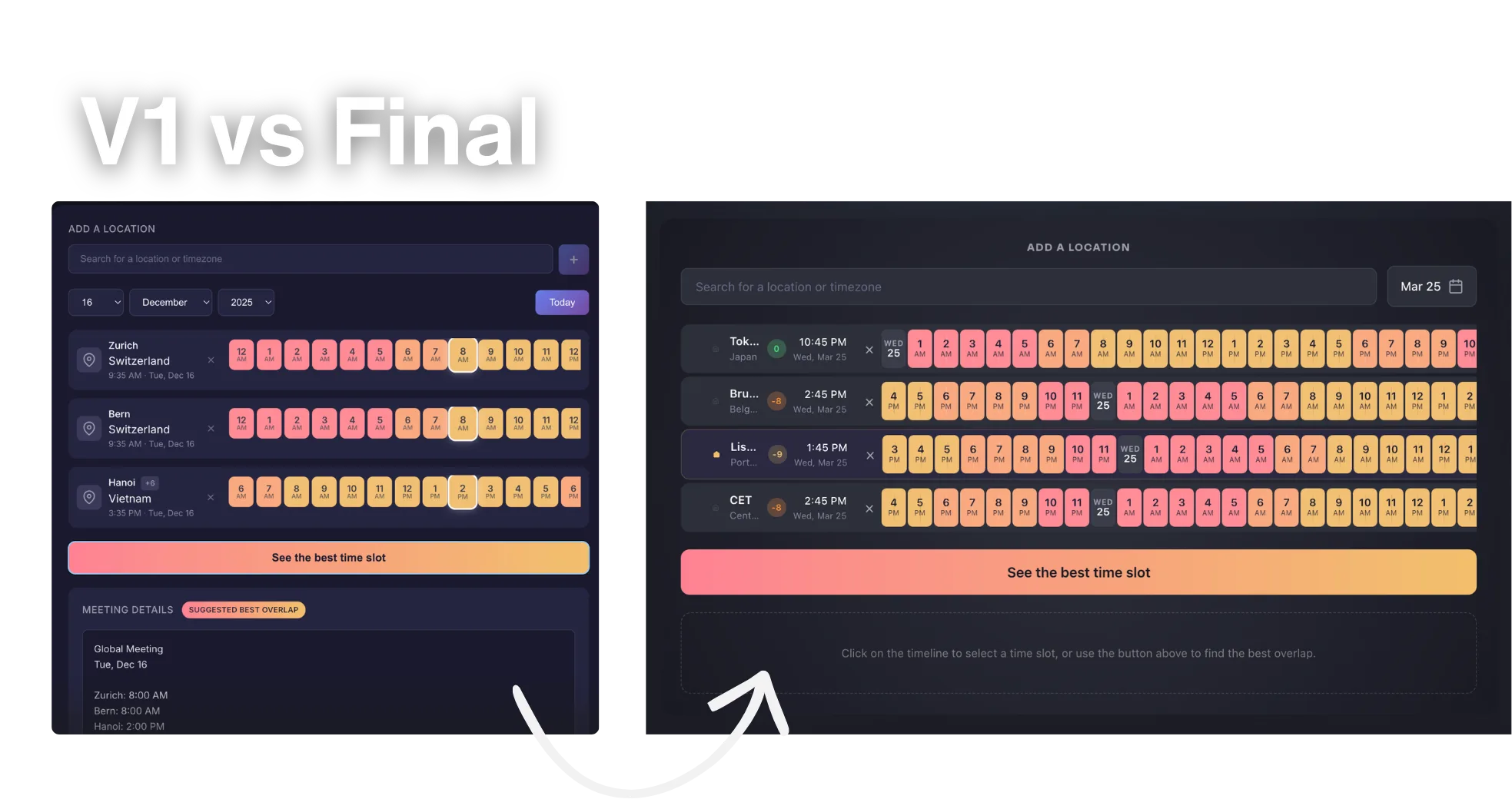
Takeaway: Ship the smallest thing that solves the search intent. Scope it from competitor gaps, not feature wishlists.
Part 5: Building and debugging
The build workflow
Once all the prep is done, CLAUDE.md, docs, design rules, deployment constraints, the actual build moves fast.
My workflow:
- I often ask Claude Code to prepare a batch of prompts for the different components
- Sometimes I automate prompt execution with scripts so multiple steps can run while I work on other things
- Review the output, test it, tell it what’s wrong
- Iterate
Yes, it costs tokens. But it speeds up execution significantly. The prep work pays off here, because Claude has all the context it needs, the output quality is much higher than if you just said “build me a scheduling poll.”
Real build timelines
| Tool | Build time (core) | Total time to launch-ready |
|---|---|---|
| Timezone Meeting Planner | < 1 day | A few days |
| Calendar Link Generator | ~1 day | ~1.5 days (faster because I had experience by then) |
| Schedule Builder | ~2 days | Several weeks of improvement |
| Scheduling Poll | ~1 week | Longest, much more complexity |
Calendar Link Generator was the fastest partly because it’s a simpler tool, but also because I had already built the workflow, the environment, and the muscle memory from the previous tools.
What broke
I’m not going to pretend this was smooth.
Bugs happen constantly:
- UI bugs: elements overlapping, spacing breaking, states not updating
- Behavior bugs: logic errors in timezone conversion, poll voting edge cases
- Mobile issues: this is often the hardest part. Some tools are genuinely difficult to make work well on mobile. Layouts that look fine on desktop completely break on smaller screens.
- Deployment / push issues: if the project structure isn’t clean or the deployment config doesn’t match what you built, things break when you push
Debugging is essential and takes real time.
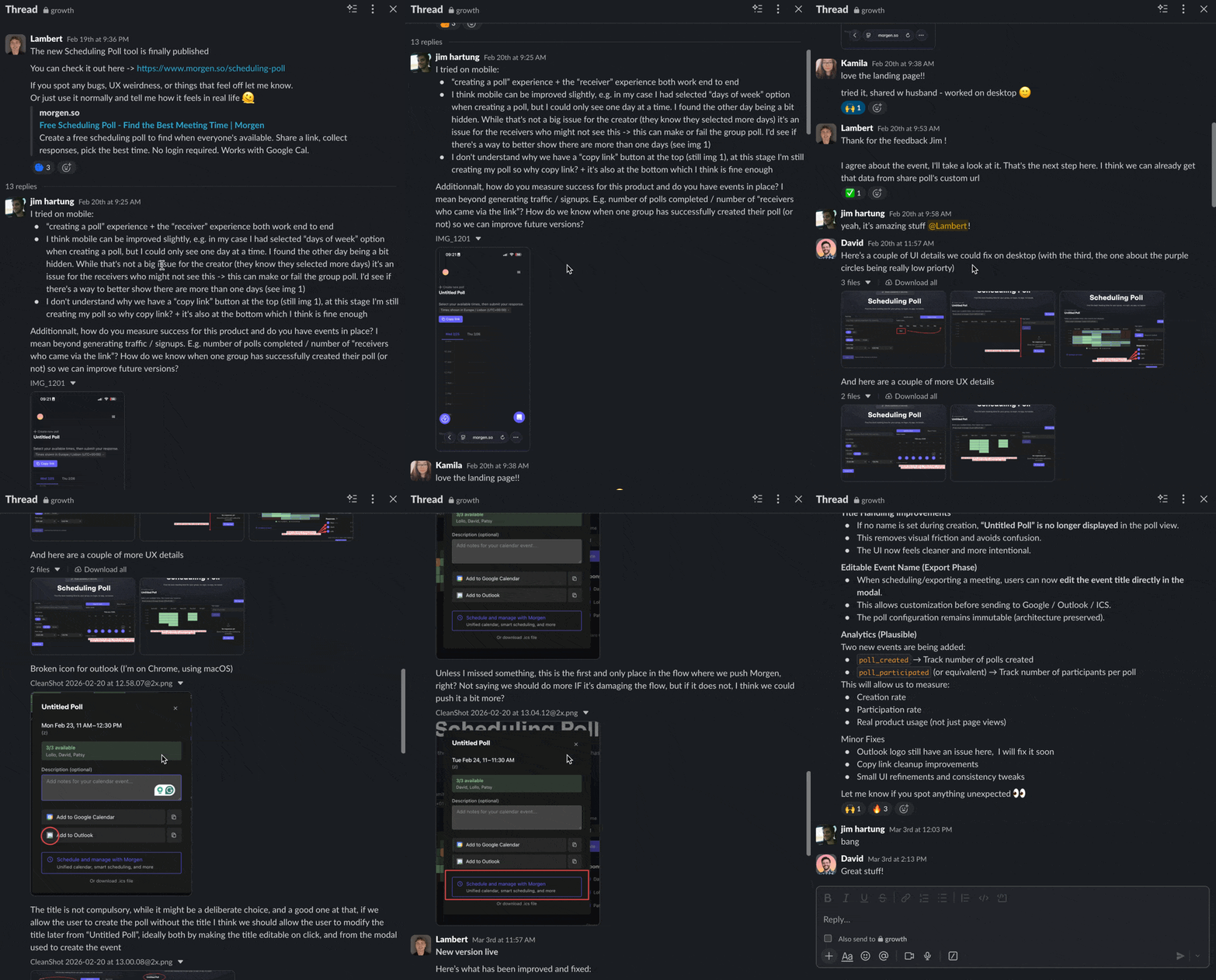
Once a build is ready, I share it internally with the team. Then we debug together. That phase can take 1 hour, 2 hours, or 5+ hours depending on the tool. It’s not optional, this is where the tool goes from “it technically works” to “it’s actually useful.”
Scheduling Poll had the most debugging by far. Shareable links, vote counting, timezone handling across participants, every one of those created edge cases.
Schedule Builder had painful mobile issues. The drag-and-drop interface that worked well on desktop needed significant rework for touch screens.
Where I spent the most time: not on code generation. On product decisions and debugging. What should the tool do? What should it NOT do? Why is this broken on Safari? Why does this look wrong on an iPhone SE?
AI handles the implementation. You handle the judgment and the testing. That split is what makes it possible for a growth person to ship tools without an engineering team.
Part 6: Launching the tool with SEO
Assets and landing page
I usually prepare assets manually. I spend around 2 hours per tool creating images, videos, and supporting visuals. I care about making the landing page strong and polished, it’s the first impression for both users and Google.
I often use Webflow, or Claude-coded blocks aligned with my Webflow codebase. The page should look like it belongs on the site, not like a hackathon project.
SEO page structure
For the SEO copy, I ask Claude to reuse the original keyword analysis and help prepare:
- Wording aligned with search intent
- Page structure optimized for the target cluster
- SEO copy foundation (not the final polish, but the structure)
My usual page structure:
- Tool first: the functional tool is at the top. The user came to DO something.
- H1: matches the primary keyword and intent
- H2 explaining how it works: simple, clear steps
- H2/H3 sections around the problem it solves: why this tool exists, what pain it addresses
- FAQ: targeting long-tail queries and “People also ask” questions
- Internal linking block: links to the other free tools
That internal linking block is important. It connects the tools strategically, someone who used the scheduling poll might also need a calendar link generator. Each tool sends authority and traffic to the others.

SEO basics that actually move rankings
Page title: include the primary keyword, keep under 60 characters. Example: “Free Scheduling Poll, Create a Poll in Seconds”
Meta description: describe what the tool does + a benefit. Under 155 characters. Example: “Create a free scheduling poll and share it with your team. Find the best time to meet in minutes.”
H1 heading: match the search intent. “Free Scheduling Poll”: yes. “Our Polling Solution” or “Morgen Poll Tool v2”: no.
URL: clean and keyword-rich.
/scheduling-poll: yes.
/tool-v2-final or /tools?id=382: no.
Page speed: tool pages must load fast. Users from Google bounce in 3 seconds. Test with PageSpeed Insights, aim for 90+ on mobile.
Linking back to your product
Every tool should link to your main product. But softly.
What works:
- “Built by Morgen” in the footer
- A small banner: “Need a full scheduling solution? Try Morgen”
What doesn’t:
- A popup asking users to sign up
- Requiring an account to use the tool
- CTAs that interrupt the experience
The tool’s job is to serve the search intent. If the tool is good, people will be curious about who built it.
Part 7: Feedback loops
A major part of improving both rankings and tool usefulness is setting up a feedback loop. This is not customer support. This is a ranking and product improvement loop.
How I collect feedback
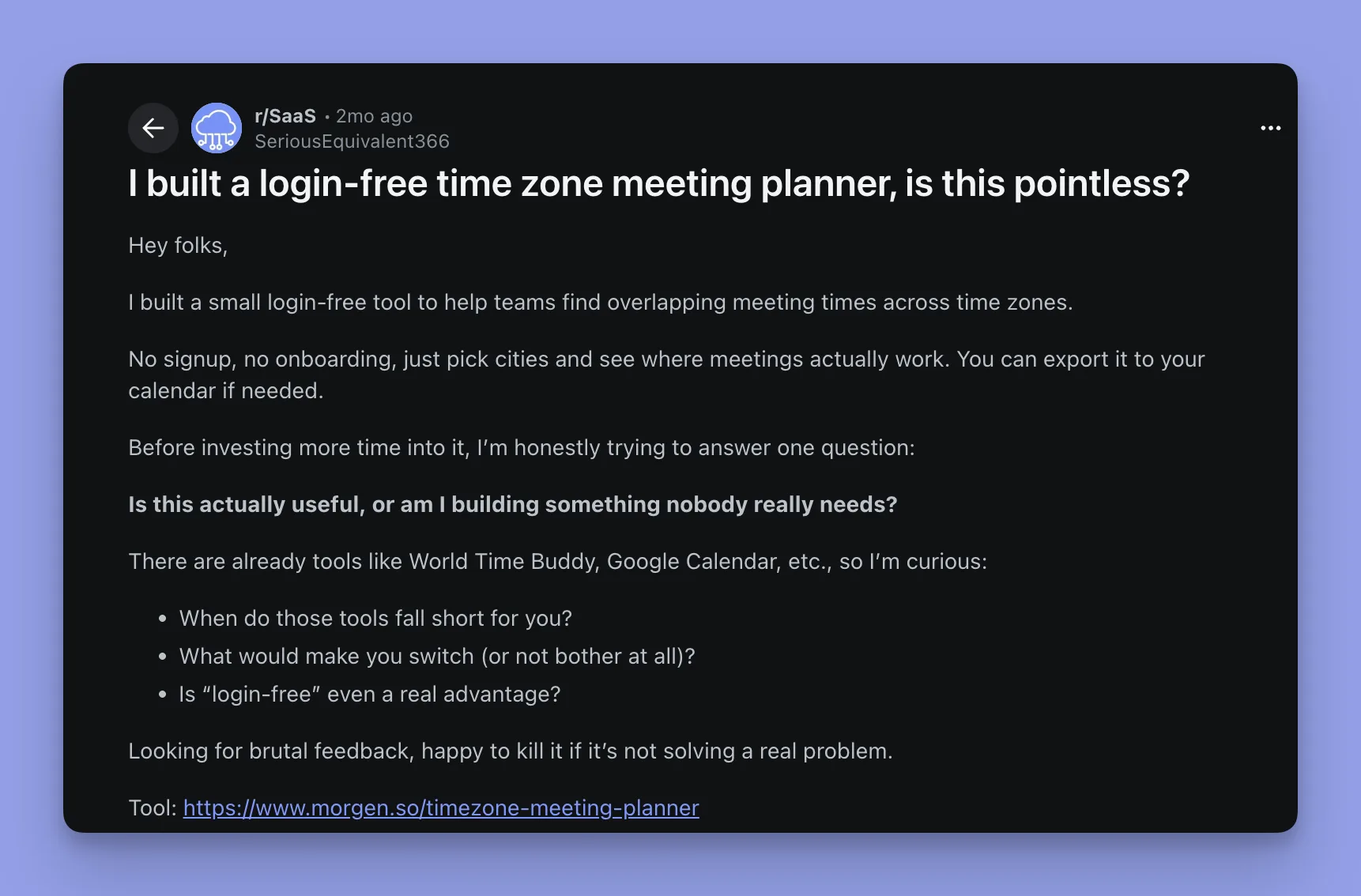
Reddit: I post the tool in relevant subreddits and ask for honest feedback. People on Reddit are direct, they’ll tell you what’s broken, what’s confusing, and what’s missing.
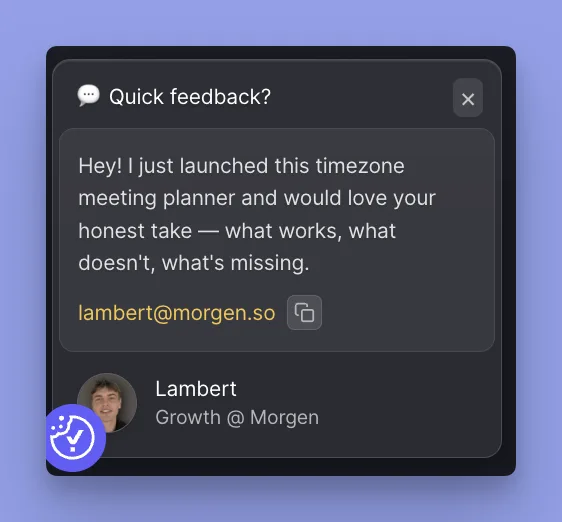
On-page feedback prompts: I embed a conversational popup / feedback prompt directly on the tool page. But I don’t show it immediately. I usually trigger it after around 20 seconds, that way I know the person actually engaged with the tool or the page. Random visitors who bounced in 3 seconds don’t get asked.
The people who take the time to write thoughtful feedback after using the tool, those are giving the most valuable insights.
What I do with the feedback
- Read everything
- Identify patterns, if 3 people mention the same friction, that’s a real problem
- Implement the change
- Ideally, respond to the person and tell them the change is live
- Get another round of input
That last step matters. When someone sees their feedback implemented and responds again, you get a second layer of insight. They’ll notice things they didn’t mention the first time.
Why this is a ranking loop
Small improvements based on real feedback → better UX → longer sessions, lower bounce rate → better engagement signals → better rankings.
It’s not dramatic. One change won’t jump you from position #20 to #3. But the compound effect of continuous, feedback-driven improvements is what separates tools that plateau from tools that keep climbing.
Part 8: Data analysis
What I track
Google Search Console:
- Impressions: are people seeing the tool in search results?
- Clicks: are they clicking through?
- CTR: is the title/description compelling?
- Average position: where do we rank, and is it improving?
Plausible:
- Time on page: are people actually using the tool or bouncing?
- Goals / custom events: this is where it gets interesting
- Engagement patterns: what do users actually do on the page?
Custom goals matter
On Scheduling Poll, I set up goals that allowed me to know:
- How many people created a poll
- How many people interacted with a single poll (voted, viewed results)
This created insight not just for SEO, but for future product thinking. If thousands of people are creating scheduling polls through our free tool, that’s signal about what the full product should prioritize.
Weekly / monthly analysis
I use reports to compare:
- Feedback received + product changes made
- Performance shifts (impressions, clicks, position)
- What’s improving and what’s stalling
The goal is to connect cause and effect. Did the UX change I made last month actually move the needle? Did the new FAQ section bring in long-tail traffic?
Automate your reporting
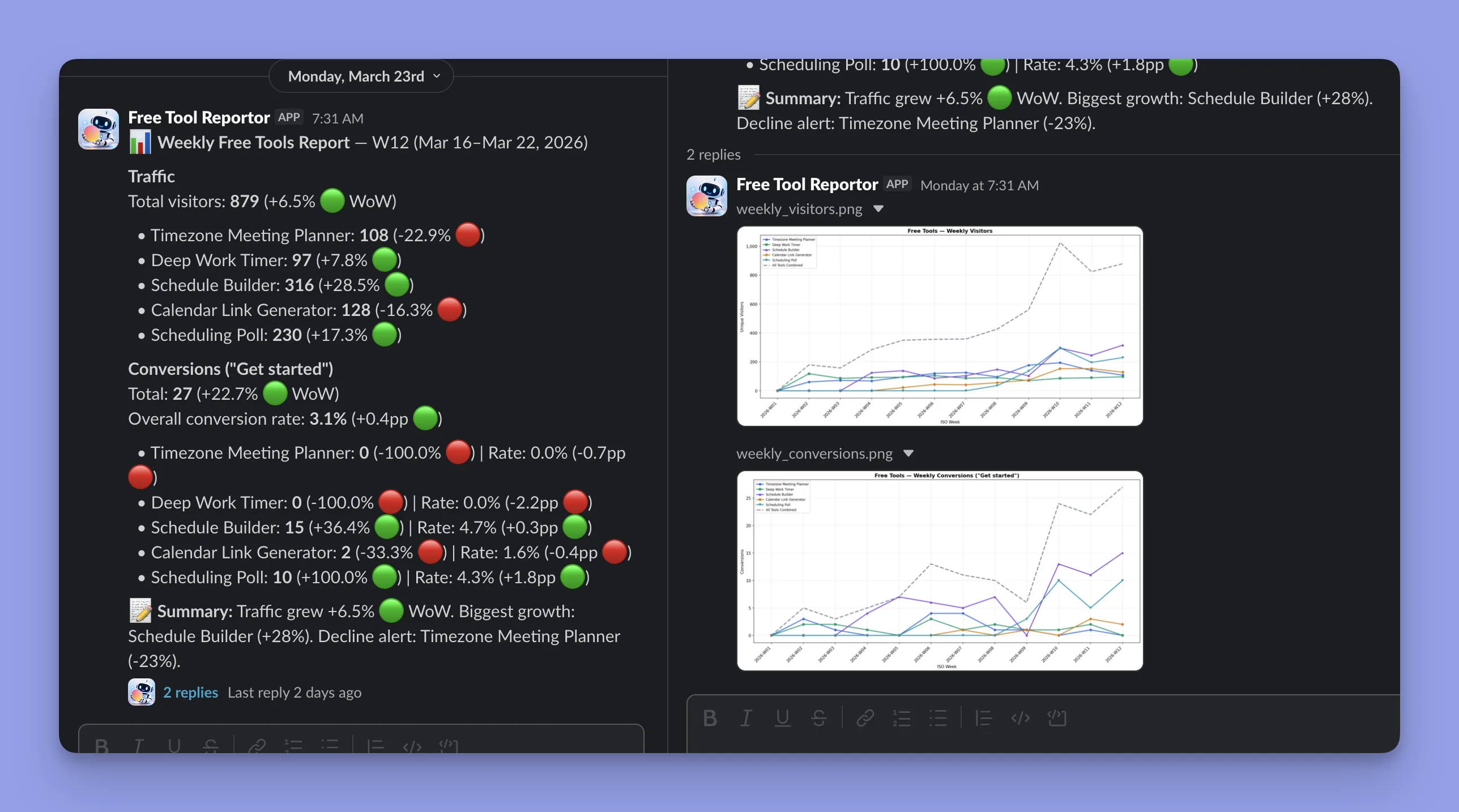
Set up automated weekly reports that go to Slack, email, or whatever your team uses. I built a bot that posts every Monday, traffic per tool, conversions, WoW changes, and flags anything declining.
Don’t rely on someone opening a dashboard. Push the data to where the team already lives. When people see “+28% on Schedule Builder” in Slack, they care more. When Timezone Meeting Planner drops 23%, I catch it Monday morning instead of discovering it weeks later.
I built mine with Claude Code in a few hours, a script that pulls from Plausible and posts to Slack via webhook. Simple, high ROI.
Part 9: Distribution
Timing matters
I do not want to talk about a tool too early.
I prefer waiting until:
- The tool has lived for a bit
- I can see whether it actually solves a need
- The main bugs are fixed
- The experience is clean enough to show publicly
“I built a thing and here’s what happened” beats “I built a thing.” When you tell the story, you want real data and a polished experience behind it.
Where I distribute
Reddit, primary channel
I engage in subreddits where similar tools or related problems are discussed. Different angle per subreddit. Don’t copy-paste.
| Subreddit | Angle |
|---|---|
| r/SaaS | Growth strategy with data |
| r/SEO | Tool vs article, the product-led approach |
| r/startups | Growth without paid ads |
| r/EntrepreneurRideAlong | Builder story |
Reddit rules: lead with the story and data, not the product. Put links at the end. Answer every comment. Don’t mention your company in the title.
The builder audience responds to real data and process. I share the story, the numbers, and the approach. This playbook started as LinkedIn content.
Continuous feedback collection
Distribution is not just promotion. Every time I share a tool, I’m also asking: does this work for you? What’s missing? What’s confusing?
Making the tool “live” means keeping it in conversation, not just publishing a link and moving on.
What I haven’t tested
I haven’t seriously tested Twitter / X for this type of content. I won’t pretend I have data there.
Part 10: Results
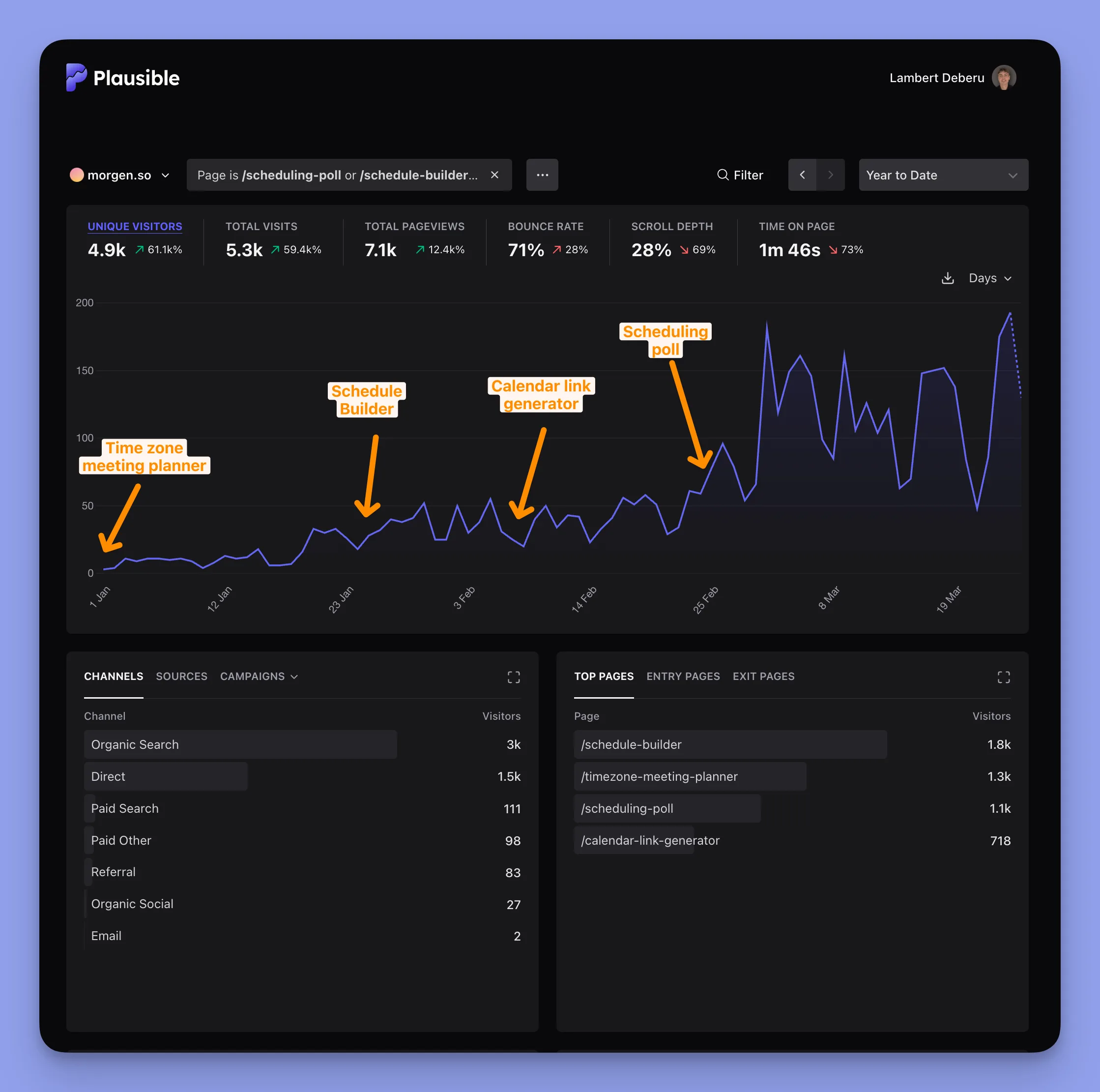
Updated April 1, 2026 → here are the real numbers after ~3 months of the free tools being live.
Traffic overview (Dec 2025 – Apr 2026)
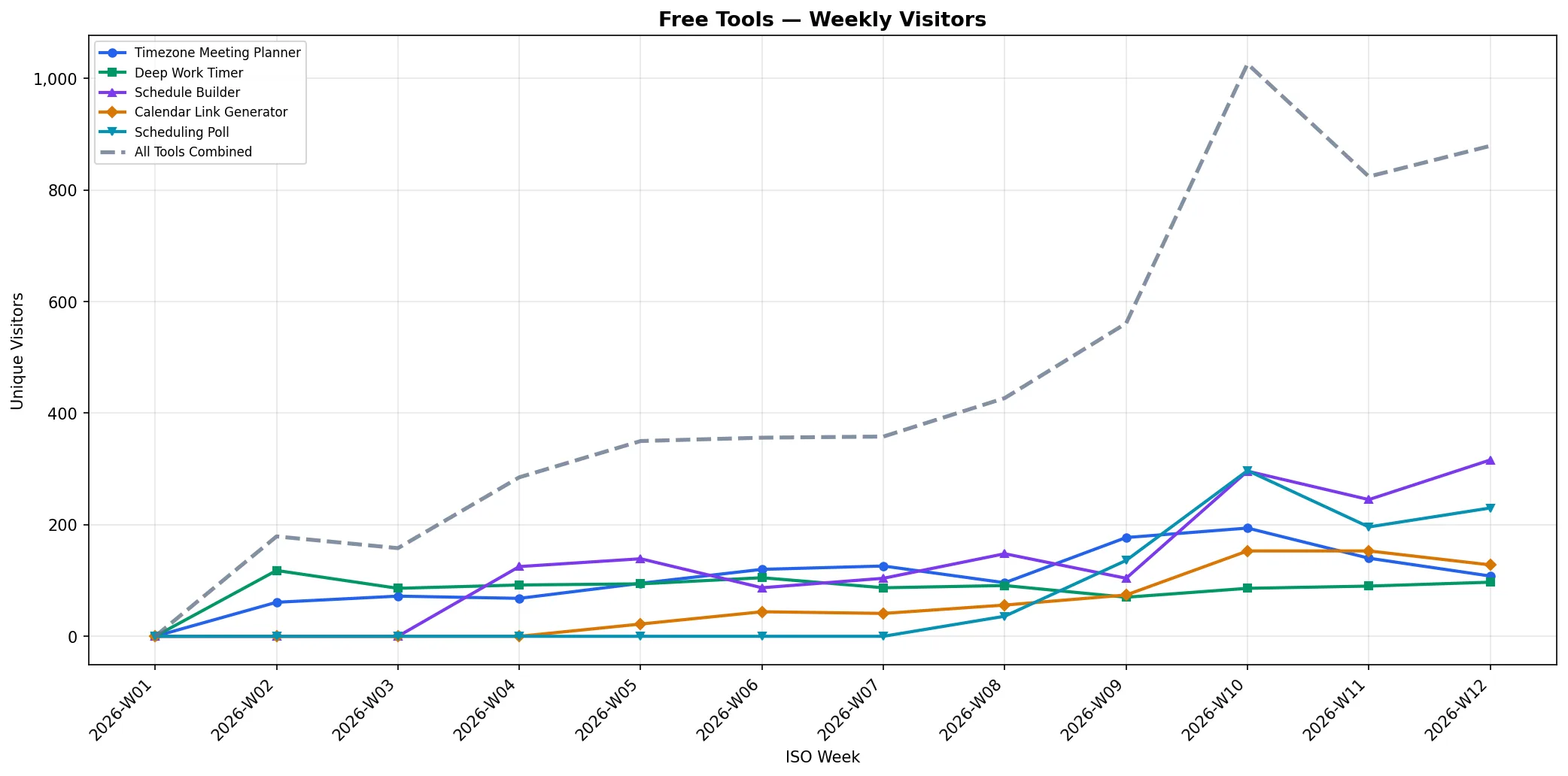
6,131 unique visitors across the 4 tools. Growth from near-zero in December to 200+ daily visitors by end of March.
Launch timeline:
- Dec 28, 2025 → Timezone Meeting Planner
- Jan 20, 2026 → Schedule Builder
- Feb 8, 2026 → Calendar Link Generator
- Feb 26, 2026 → Scheduling Poll
4 tools shipped in 2 months.
Traffic by tool
| Tool | Unique Visitors | Launch Date |
|---|---|---|
| Schedule Builder | 2,387 | Jan 20 |
| Timezone Meeting Planner | 1,543 | Dec 28 |
| Scheduling Poll | 1,372 | Feb 26 |
| Calendar Link Generator | 829 | Feb 8 |
Traffic sources
| Source | Visitors |
|---|---|
| 3,300 (55%) | |
| Direct / None | 1,900 (32%) |
| ChatGPT.com | 415 (7%) |
| Bing | 82 |
| DuckDuckGo | 77 |
| Others | ~100 |
The surprise: ChatGPT.com is our #3 traffic source. These tools don’t just rank on Google → they get recommended by AI. I didn’t optimize for this. It happened because the tools solve real problems clearly.
Conversion funnel (Amplitude)
From the 4 tool pages:
- 291 users logged in (from free tool visits)
- 111 completed onboarding
- 1 paid subscription (from Scheduling Poll, March 25, 2026) → that’s $180/year in ARR from a single free tool conversion
That’s right → our first paying customer came from a free tool. The full conversion path: free tool visit → login → onboarding → subscription.
It’s one person. But it proves the system works end-to-end. Free tools can drive real revenue, not just traffic.
Key engagement metrics
- Bounce rate: 71%
- Scroll depth: 27%
- Time on page: 1m 45s
Bounce rate is high, but that’s expected for tools → many people use the tool and leave. What matters is the 29% who engage deeper, and the 1m 45s average time which shows real usage.
What’s next
The system is working. The numbers are small but growing fast → the curve is exponential, not linear. Next priorities:
- Improve activation rate (291 logins → 111 onboarded = 38%. Good, but can be better)
- More tools in the pipeline
- Apply the same playbook to Kai
Part 11: Update, August 2026
Updated 26 August 2026 → twelve months of Google Search Console data, from August 2025 to July 2026.
The headline: the biggest organic page on morgen.so is no longer the homepage. It’s a Pomodoro timer.
In July 2026, /pomodoro-timer pulled 4,697 clicks from Google. The homepage pulled 3,478. And the single biggest keyword on the whole domain isn’t the brand name. “pomodoro timer” brought 3,448 clicks at an average position of 6.4, against 1,736 clicks for “morgen”.
Read Part 2 again and you’ll see the problem with that. I looked at a focus timer, scored it 3K volume and KD 44, and wrote it off: “pomofocus.io and marinaratimer.com already own this space. Bad ratio.” I was wrong. We shipped a Pomodoro timer in April 2026 and it became the largest page on the site in three months.
The 12-month picture
| Aug 2025 | Jul 2026 | |
|---|---|---|
| Organic clicks / month (whole site) | 8,333 | 34,470 |
| Organic clicks / month (free tools) | 0 | 8,328 |
| Free tools’ share of organic clicks | 0% | 24% |
| Average position (whole site) | 15.8 | 6.5 |
| Referring domains | 1,151 | 3,056 |
| Domain Rating | 67 | 73 |
Across the twelve months, the site took 242,980 organic clicks. The tool pages took 25,559 of them, and 75,276 unique visitors from every channel combined.
Clicks per tool, 12 months
| Tool | Organic clicks | Live since |
|---|---|---|
| Pomodoro Timer | 11,309 | Apr 2026 |
| Schedule Builder | 9,735 | Jan 20, 2026 |
| Deep Work Timer | 1,633 | 2025 |
| Timezone Meeting Planner | 1,132 | Dec 28, 2025 |
| Scheduling Poll | 1,021 | Feb 26, 2026 |
| Calendar Link Generator | 306 | Feb 8, 2026 |
| Localized versions (fr, it, pt) | 397 | 2026 |
Twelve months, in one chart
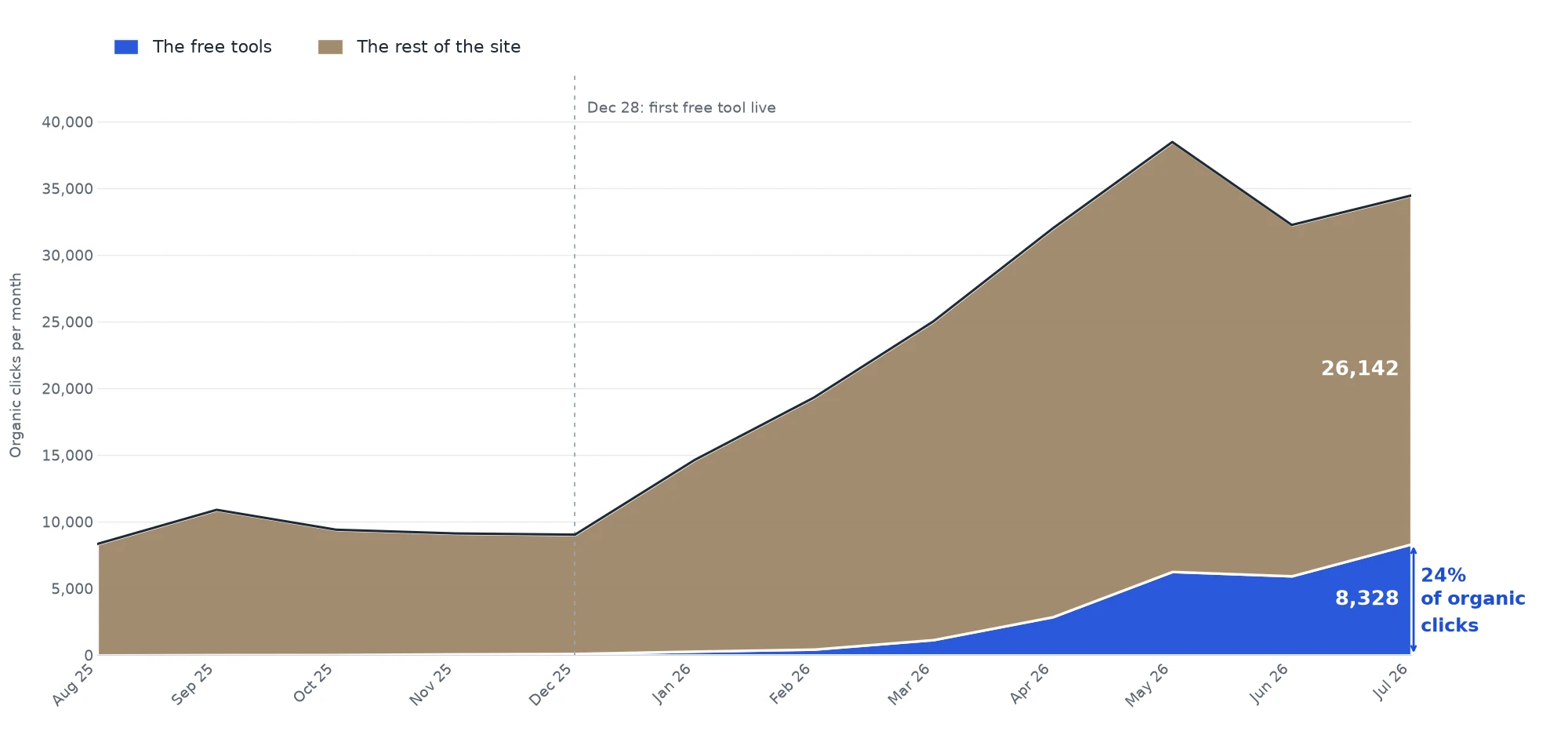
Brown is everything on morgen.so that isn’t a free tool. Blue is the tools. Both are Search Console clicks, stacked, so the top edge is the site’s real monthly total.
The rest of the site grew too, and I wanted to know whether the tools caused that. Plenty of people would have drawn a third band called “halo” and claimed it. So I ran the test instead. I froze a cohort of 18 non-tool pages that were already earning clicks in December 2025, before any tool ranked, and tracked them to July.
They grew 34%. The site grew 282%.
Of the 17,224 extra monthly clicks the non-tool pages picked up, 1,347 came from pages that already ranked in December. The other 15,877 came from pages that were earning nothing at all. The count of pages taking at least one click a month went from 384 to 1,506.
That’s the opposite of what a domain-authority halo looks like. If Google had started trusting the site more because of the tools, the pages that already ranked would have moved the most. They barely moved. What grew is surface area, pages that weren’t showing up at all and started to.
There’s a timing problem too. The inflection is January, and in January the four live tools had 291 clicks between them against the site’s 14,627. Two percent of the traffic can’t move the other ninety-eight. I don’t know what caused that January step. Nothing in our docs or sprint logs records a change in that window. I’d rather leave that gap open than fill it with the flattering answer.
What the tools didn’t do
They didn’t make money.
Since attribution started in October 2025, 3,407 people signed up to Morgen whose first landing page was a free tool. Four of them paid. Net revenue: $409.
That’s a 0.12% signup-to-paid rate. In April I called our first paying customer proof that the system worked end to end. It does work end to end. It just works at a rate that makes free tools an audience machine, not a revenue machine, at least on this product.
The clearest signal of what these visitors actually are: of everyone who lands on a tool and goes on to look at another page, the most common next page is /pricing, 3,289 views over twelve months. They’re curious. They’re just not buying a calendar because they liked a timer.
Why it didn’t convert
The reason took me eight months to see, and it was sitting in the thing I copied.
I built this after writing my thesis on loginless experiences, mostly from what Henrique Cruz published about the strategy at Rows. Rows put their entire spreadsheet behind no login. You land on it, you type, you have a working spreadsheet, and their signup conversion went from 11% to 19%. iLovePDF does the same thing. You drop a file, it does the job, no account.
I read that as a growth tactic. It isn’t. It’s a condition.
Rows works because a spreadsheet is useful five seconds after you land on it, with nothing connected. Morgen is a calendar. It’s worth nothing until you connect your accounts, so the product itself could never go behind no login. What I could build instead was a set of utilities next to the product: a timer, a poll, a link generator. Those are not Morgen. Someone who times 25 minutes of focus has no reason to open a calendar app afterwards, because nothing they just used was our product.
So here is the honest version of Part 1, twelve months on. Loginless works when your product delivers value cold. If it needs setup before it does anything, you can build tools around it and you will get traffic, but you are running an audience play, not an acquisition play. Decide which one you are running before you spend eight months on it.
What it was actually good for
One return I did not plan for.
The scheduling poll turned into a demand test I could not have bought. People keep emailing to ask when it ships inside the product and telling me they would pay for it. That is a sharper signal about what to build next than any survey I could have run, and the poll is on the roadmap because of it.
If you run this play on a product that needs setup, that is the return I would underwrite. Not signups. Evidence about which feature people want badly enough to go looking for it on their own.
Three things I didn’t expect
Tools decay too. I wrote in Part 1 that tools compound while articles decay. That’s half true. Timezone Meeting Planner went from 287 clicks in April to 55 in July, an 81% drop, without me touching it. Someone else out-shipped us on that keyword. A tool is a product, and products lose to better products.
AI keeps sending traffic, quietly. Over twelve months, 732 visitors landed on a tool page straight from ChatGPT, 91 from Perplexity, 49 from Gemini, 32 from Claude. Product Hunt sent 856. Nobody optimized for any of that.
Ranking gets you spammed. Once /pomodoro-timer hit page one, it collected 1,190 referring domains in four months. Almost every one is a throwaway .xyz, .info or .asia with Domain Rating under 1 and zero traffic. It’s a link blast, not a backlink win. If you’d read our referring-domain count going up and called it earned authority, you’d have been reading spam. Check the domains before you take the credit. Kai’s referring-domain count has the same tail, and telling the two apart is most of the work in that programme.
What I’d do differently
Build the “too competitive” one anyway. The scoring model I described in Part 2 told me to skip the focus timer because two incumbents owned it. That model was measuring the wrong thing. Volume and difficulty tell you how hard the keyword is. They don’t tell you how bad the incumbents are, and the incumbents in that space were ad-heavy, slow, and ugly. A clean fast page beat them.
Pick tools closer to the paid product. Pomodoro Timer and Schedule Builder bring the most people and convert the worst, because a person timing 25 minutes of work isn’t shopping for a calendar. Scheduling Poll brings fewer people who look a lot more like customers. Next round, I’d optimize for the second shape.
The system
More tools are coming. But the system matters more than any single tool.
- Find tool-intent keywords in your product space
- Use product context + keyword data to identify opportunities
- Prioritize by traffic, difficulty, and build speed
- Scope the MVP from competitor gaps
- Build fast with AI, debug thoroughly
- Launch with strong SEO and a polished page
- Collect feedback, improve, measure
- Distribute when the tool is ready, not when it’s new
- Repeat
If you’re a growth person, marketer, or builder at a SaaS company thinking about organic traffic, this might be the highest-leverage move you haven’t tried yet.
About Morgen
Morgen is a scheduling and productivity app. The free tools are one piece of how we think about growth.
We’re also building Kai, an AI agent that does things for people. Same growth playbook, new product.
Follow the journey:
Thanks for reading
This isn’t theory. It’s a documented process from building real tools at a real company.
If it was useful, share it with someone who’s rethinking their SEO approach.
Questions? Message me on LinkedIn, happy to help.