I replaced Screen Studio with Claude. Our product films aren't screen recordings anymore.
How I built a Claude skill that films Kai from its own code instead of recording my screen: how it works, the rules my reviews wrote, what broke, and the product problems the films caught.
Hey!
My name is Lambert, and I run growth at Kai, so when our homepage doesn’t convert, it’s my problem.
That’s the first thing you see on our homepage. An investor proposes a call by email, the call lands on top of a 1:1, Kai flags the clash and moves the 1:1 to the slot you pick, then you ask Kai to tell Jim and the message shows up in Slack. It looks like a screen recording. It isn’t. There’s no real account behind it and no Screen Studio project. Claude built it from Kai’s own code, one frame at a time.
Until the end of August, I made our product videos in Screen Studio. Every film of Kai I’ve made since came out of a Claude skill I built in 3 or 4 days. Jim, our growth lead, and I talked about it on How We Grow #013, our weekly podcast, and this is my side of it, with more detail than a podcast has room for.
The films also keep catching problems in the product itself, which I never planned for.
Our homepage needed to show the product running
We got the team around a table and asked what someone should see in their first seconds on the site. One side wanted to show what Kai is worth without showing the app. The other wanted the app and its value together, which meant video.
Jim settled it for me on 27 August. He looked at our hero section and said, “I can’t tell what the product physically is.” He was right, and I built the first film that evening.
I ruled out a motion designer and Screen Studio
A motion designer was the polished option. You pay a couple of thousand dollars and you get a beautiful film. But Kai’s interface still changes month to month, so within a few weeks that film shows an app that looks different from the real one. And you’ve paid for one story before you know whether it’s the story that gets people to sign up.
Screen Studio was the option I knew, and I like it. For a product like Granola or Wispr Flow, where the main feature is 2 steps away, it’s perfect: you hit record, do the thing, add a few zooms. Kai isn’t that product. To film a moment, I had to make it happen first, so if I wanted a notification in the shot, I had to get one to fire on cue. My real account has thousands of emails and private Slack conversations in it, which meant every clip I recorded for our What’s New page ended with me blurring things in the edit. Sometimes the app did something I didn’t expect halfway through a take. That’s a good bug report and a useless video. And when a clip was finally right on desktop, I had to do it all again for the phone.
I rebuilt Screen Studio inside our website
So I tried a third way. I gave Claude our whole knowledge base and the app’s codebase, and I rebuilt what Screen Studio does (the moving cursor, the zooms, the highlight on a click) without its interface. After 3 or 4 days, it was good enough to start making films.
The app never gets recorded. Our website has a replica of the Kai app, built in React, and its colors and text aren’t copied by hand: they’re generated from the app’s source code. If a screen in the replica hasn’t been checked against the app in 45 days, or a string the app uses disappears, the site’s tests fail. That check exists because an older replica on our site spent 7 weeks showing a version of the app that no longer existed, and nothing flagged it. The replica follows the latest version of the app, so a film I make today shows Kai the way it shipped this week.
On top of the replica sits the film set: a macOS desktop with a real menu bar and a dock (Morgen, Claude, Chrome, Wispr Flow, Gather and Kai, always in that order), real macOS notifications, a cursor, a camera, and the same kit for an iPhone. Every film imports those pieces. None of them get redrawn.
A film itself is a React scene that depends on one number: the frame you’re on. There’s no CSS animation and no timer. To shoot it, Playwright opens the scene once per frame and takes a screenshot, and ffmpeg stitches the screenshots into an mp4. The same command always produces the same file, so when the app’s design changes, I run that command again instead of starting over.
Every story ships twice from one description: a 1600×900 cut on a Mac, and a 1080×1920 cut on an iPhone running Kai’s mobile app. The phone cut exists because of the homepage. On a phone, the desktop film shrinks until the app’s text is about 4 pixels tall, and nobody can read that. Our site’s tests refuse any video over 1 MB, and ours land between 290 and 900 KB.
Because the desktop is built rather than recorded, nobody sees my apps or my messages. Everyone outside our team is invented, down to the client, a company called Northwind. Teammates can appear as themselves, and no real customer ever shows up. On the podcast I called it faking things in the good way.
A film starts with me telling Claude a story
I packaged all of it as a Claude Code skill called /film. When I run it, I tell Claude a story the way I’d tell it to someone sitting next to me. For the Morning Brief film, it went roughly like this: a notification from my morning brief arrives, I click it, I see tasks that are overdue, I select them, a suggested action offers to plan them today, I click that, and they land on my calendar for me to accept.
Claude doesn’t start building. It cuts the story into beats, one click per beat, checks that every screen in it exists in the replica, and checks every action against our product docs. Kai proposes and the user acts, so if my story has Kai doing something the product can’t do, Claude tells me. Then it asks every question it has and waits for my go.
My first version of the skill went straight to video, and that was a mistake. Making a video costs a lot of tokens, and every round of feedback on a 20-second mp4 costs them again. Now Claude exports 6 to 10 real stills first, one per beat, with a note on what happens in each. That’s where I push back hardest, because arguing over a PNG costs almost nothing.
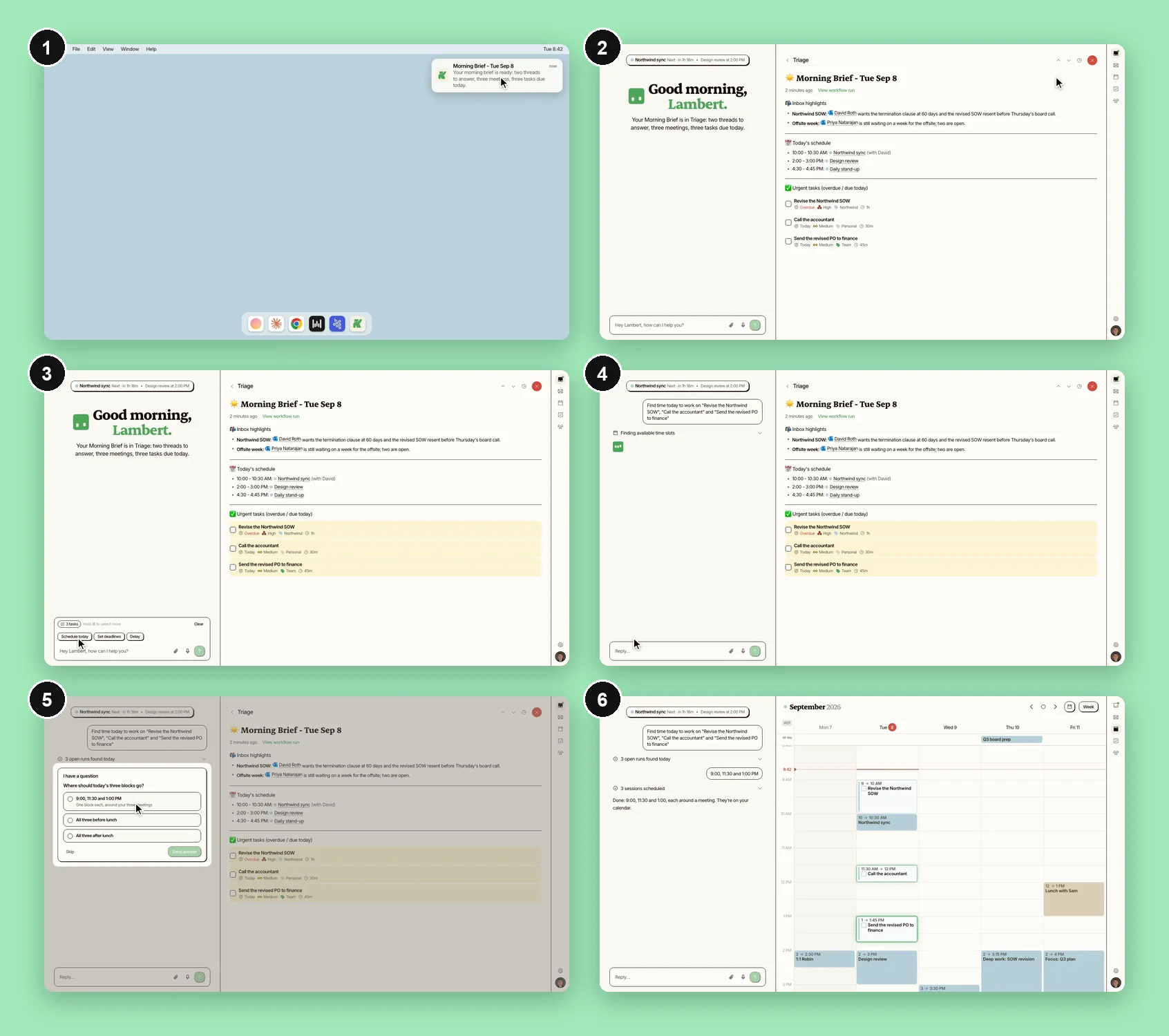
Those stills do a second job. I still use CleanShot to send the team annotated screenshots, and for articles that need a picture of something other than our app. But from now on, when I need a picture of Kai, it comes out of the same scene as the film.
Once the stills are right, Claude renders the mp4, and a film usually takes 2 or 3 more rounds after that. A highlight lands on the wrong thing, or the cursor moves in a way that doesn’t read. Every one of those corrections becomes a rule. I tell Claude what’s wrong, Claude writes it into the film rules with the date and who asked, and the next film starts with it fixed.
It’s fast now. The first version of the homepage film shipped on desktop and phone on the same day, and the Morning Brief film took a day from story to mp4. Between 27 August and 9 September I made 6 films and 9 cuts, not counting 2 that I pulled.
My reviews turned into a rulebook
The rules file is my taste, written down with dates.
On the very first night, I rebuilt Screen Studio’s zoom, and by midnight the camera had gone from jumping, to pushing, to drifting, to gone. It came back on the next films, with 3 moves on one and 5 on another, which I told Claude was too much. On 4 September I dropped it for good. The highlight on each click carries the eye better than a zoom does, so a film now gets no camera unless it can’t be read without one. The feature Screen Studio is known for is the one my reviews took out.
The Screen Studio cursor went too. Ours is a plain macOS arrow with no animation of its own. When it clicks something, the thing it clicked lights up with a green ring for about half a second, never the pointer.
The spotlight, where the frame dims around one element, is for Kai’s actions only, 2 or 3 per film. On one film Claude lit up every single click, and I had to explain that nobody cares when someone clicks “end the meeting”. And when Kai writes something on screen, a summary or a brief, it gets written in piece by piece, in reading order. Switched on all at once, it looks pasted instead of written.
Some of the rules are tiny. When Kai places a block on the calendar, it lands with a small green glow so you see it arrive. In one film I moved a session from 3:30 PM to 1:00 PM because the calendar view ended before 3:30. And if Google Meet is the app in front, the menu bar has to say Google Meet. Leave it on Finder and you’ve drawn a Mac nobody uses.
The team writes rules too. Jim’s: every line of text on screen fits on one line, and when the site already draws a phone around a film, the film doesn’t draw a second one. And David, our CEO, added one after a film where Kai’s Slack message went out under someone else’s name with a “from Kai” signature: “No one will read ‘signed by Kai’.” Now Kai posts as Kai.
It broke twice in 2 days
On 8 September I shipped a film called the Brain Dump Cut. Claude had drawn its chat, its task list, its calendar and its brief by hand instead of taking them from the replica. An audit found 42 defects, 13 of them against rules we had already written down, and I pulled it the same day. The rule it left: a film shows the app exactly as it is, and nothing gets redrawn for the camera.
The next day was worse. The phone cut of one of our films went live on a landing page as a recording of our own 404 page, 336 frames of it. Claude had made the capture script by copying another one and running a find-and-replace, which also rewrote the address of the page to film, and the script filmed whatever the server sent back. The stills I’d approved came from a different script, so they looked perfect. Claude told me the film was live and verified, because the server answered with a 200 and the file matched the one in the repo. I saw the 404 on my phone. We replaced it within the hour, and the rule it left is the one I’d give anyone building this: check frames from the final file, not the process that made it.
The films keep catching problems in the product
Jim and I only saw this after a couple of weeks of doing it, and it’s the reason I think product teams should make their videos this way.
On the podcast we went through the obvious advantages. Films are cheap and fast, so we can test which story converts instead of paying for one and hoping. They show the latest version of the app. One description gives me a desktop cut and a phone cut, with nothing private to blur. And when a creator makes a video about Kai, I can build them a flow that fits their audience.
The one I didn’t expect is product feedback. A film shows the app exactly as it is, for 20 seconds, with nowhere to hide, so when a step looks unnatural or clunky on film, it’s almost always unnatural in the product too. And because Claude checks every beat against the app’s source before animating anything, I find out the moment my story asks for something the app doesn’t do the natural way, before a single frame exists.
The Morning Brief film is the clearest case. The story I wrote was the obvious one: I open my brief, I see 3 overdue tasks, I select them right there, and I ask Kai to find time for them today. Claude came back and told me the app doesn’t work that way. In the brief, those tasks are links, not rows you can select, so in the real app you’d go to your task list first and select them there. On a 22-second film that detour is impossible to miss, and if you can’t miss it on film, a real user feels it too. I kept the natural version for the film, and the decision sits in the code with my name and the date on it, so nobody takes it for how the app behaves today.
The phone did the same thing to our email film. On a narrow screen, the app shrinks the “Do it with Claude” button down to a Claude logo and a small arrow. In a film whose whole point is handing a task to Claude, the icon alone didn’t say that, so the phone cut keeps the words. If a viewer can’t read that button in a film made to explain it, a new user on their phone probably can’t either.
With Screen Studio I found bugs by accident, in the middle of a take. Now every film is also a review of the flow it shows, and the note comes with a 20-second video of how the flow should feel.
The first homepage test pointed the right way
From 29 August to 7 September, half of our homepage visitors got a new page with a film in the hero, and the other half kept the old page with an illustration. We counted clicks on a sign-up button.
| Page | Visitors | Clicks | Rate |
|---|---|---|---|
| Old (illustration) | 754 | 29 | 3.85% |
| New (film) | 765 | 44 | 5.75% |
That’s 49% better, at p = 0.083, and no, it isn’t proof the film works. We’d have needed about 1,990 visitors on each side to be sure, and we had around 760. About two thirds of the sample came from one creator push on 3 and 4 September. And the new page changed the headline and the layout too, not only the film. I shipped it on 8 September anyway, on the direction.
I’m 99% sure the story on the homepage today isn’t the best one we have, so the next tests put one story against another, each with its own headline, and change nothing but the hero. At our organic traffic, 10 to 25 visitors per side per day, one of those tests takes 2 to 3 months. So the plan is to run them where the traffic already is: our paid landing pages, and the days a creator sends people our way. A new story costs me a day, which is the only reason that plan is affordable.
I want the films to get sound, and eventually 3D
The machine isn’t only mine anymore. On 15 September Jim shipped 5 short phone films for our creators page on the same film set, and signed them off himself.
The next films are teasers for social, then our launch video, which will mix these films with real footage of us talking.
After that, I want films that keep up with the product on their own. When something relevant lands in our changelog, I want to get flagged and have the affected films shot again. Today that happens when I ask for it.
Sound should be easy to add. Claude wrote every frame, so it knows exactly when each click and each keystroke lands, and that’s where a sound from a sound bank goes.
And the end goal is 3D: the kind of launch video big SaaS companies pay a studio for, where the app moves through space instead of sitting flat on a screen. The machine can’t do that yet.
About Kai
Kai is an AI executive assistant, built by the team behind Morgen. Jim wrote up this project, with the homepage test in full, in How We Grow #013, and you can watch the episode on YouTube.
Follow the journey:
If you make product videos and you think Screen Studio still wins for your product, tell me on LinkedIn.